Producing engaging short-form marketing videos often involves coordinating multiple creative elements, including audio, visual effects, facial animation, and timing. While traditional video editing software offers extensive creative control, using an AI Rap Video Generator can simplify certain production tasks by combining multiple processes into a single workflow.
Marketing teams at growing startups increasingly rely on short-form video formats for product announcements, hackathon recaps, founder updates, and company milestones. Creative formats featuring two people interacting, exchanging dialogue, or performing together can make these videos more dynamic and engaging. However, producing this type of content using traditional editing software may require several separate steps, including recording audio, editing background music, synchronizing speech, and refining facial movements.
The production process becomes particularly challenging when deadlines are tight. Understanding the differences between dedicated video generation tools and general timeline-based editors can help creative teams choose the right approach for their content requirements.
Why General Video Platforms Struggle With Rhythmic Lip Sync
General-purpose video generation platforms are designed to support a wide range of creative applications, from cinematic landscape footage to product demonstrations and character animations. However, generating videos that involve multiple people speaking or performing in sync with music introduces additional technical challenges.
One common difficulty is coordinating audio and facial movements. In conventional production workflows, audio may be generated or recorded separately before being incorporated into the video. Editors must then align dialogue, musical beats, and facial movements to create a convincing result.
When these elements are not synchronized accurately, the final video can feel unnatural. For example, mouth movements may not match the spoken words, facial expressions may appear disconnected from the audio, and transitions between speakers can interrupt the flow of the performance.
Videos featuring multiple people introduce further complexity. Maintaining consistent facial appearances, assigning dialogue to the correct individuals, and coordinating transitions requires careful editing and quality control.
These challenges do not make general-purpose video software unsuitable. Rather, they highlight the importance of selecting tools based on the complexity of the intended production.
Understanding Specialized Video Generation Workflows
Specialized video generation platforms approach production by focusing on particular content formats or creative requirements. Instead of offering a broad collection of editing capabilities, they often automate specific tasks that would otherwise require multiple applications.
For example, music-oriented video generators may combine audio creation, rhythm synchronization, and facial animation within one production workflow. This can reduce the need for manual adjustments and make it easier for creators to experiment with different concepts.
Depending on the platform, users may be able to provide images, select a visual environment, enter a creative prompt, and generate a video using automated processing.
Architectural Differences in Render Pipelines and Audio Mapping
In conventional video production, visual footage and audio are frequently handled as separate assets. Editors combine them during post-production, adjusting timing, transitions, and synchronization as needed.
Specialized generation systems can integrate some of these processes into a unified rendering pipeline. For music-based content, this may involve analyzing audio timing and coordinating facial movements with vocal delivery.
The advantage of this approach is workflow efficiency. Rather than manually adjusting every element, creators can rely on automated processing for repetitive synchronization tasks.
However, automated results still require review. Audio clarity, facial consistency, expression quality, and overall visual presentation can vary depending on the source material and generation technology.
Maintaining Multiple Performer Identities
Videos featuring two or more individuals require consistent identity preservation throughout the production.
General video tools may struggle with complex scenes involving multiple faces, rapid movements, or frequent transitions. Potential issues include facial distortion, inconsistent appearances, and confusion between subjects.
Specialized systems may use separate identity tracking and facial modeling techniques to improve consistency. These capabilities are particularly useful for dialogue-based videos, collaborative performances, and other formats involving multiple participants.
Workflow Comparison Across Production Metrics and Editing Speed
Comparing production approaches across practical variables helps creative teams understand the advantages and limitations of different video creation methods.
The following comparison highlights how conventional editing workflows differ from automated video generation approaches.
| Production Variable | General Timeline Editing | Specialized Video Generation |
|---|---|---|
| Input Requirements | Video footage, audio files, graphics, and editing assets | Images, prompts, and selected creative inputs |
| Production Time | Depends on editing complexity and manual adjustments | Often faster for supported automated formats |
| Audio Synchronization | Frequently requires manual alignment | May include automated synchronization |
| Multiple Subjects | Can require separate tracking and masking layers | May support dedicated multi-subject processing |
| Creative Control | Extensive manual editing flexibility | Depends on available generation settings |
| Output Customization | Detailed control over transitions, effects, and timing | Primarily limited to supported generation features |
| Technical Requirements | Editing knowledge and compatible software | Varies by platform and generation workflow |
Neither approach is universally better. Timeline editing remains valuable when projects require precise creative direction, complex visual storytelling, or extensive post-production.
Automated generation is more useful when the objective is to produce a particular content format quickly without manually managing every production element.
Automated Audio Timing Without Manual Waveform Editing
Audio synchronization is an important part of producing music-based and dialogue-driven videos.
Traditional editing workflows require creators to examine audio waveforms, identify important timing points, and adjust video sequences accordingly. This can become time-consuming when multiple speakers, musical transitions, and rhythmic changes are involved.
Automated systems can simplify these tasks by analyzing audio timing and aligning visual elements with the generated soundtrack. While this does not eliminate the need for quality checks, it can reduce repetitive editing work and accelerate the initial production process.
Understanding Production Costs and Output Quality
Budget considerations play an important role when selecting video production software, particularly for marketing teams creating content regularly.
Traditional editing workflows may involve several expenses, including software subscriptions, specialized plugins, stock media, audio production, and additional editing resources. These costs can vary significantly depending on the complexity of the project and the number of tools required.
Automated video generation platforms generally use different pricing structures. Common models include monthly subscriptions, usage-based credits, and pay-per-generation options.
Before selecting a platform, creators should evaluate several factors:
- Generation costs: Understand whether pricing is based on video duration, resolution, processing requirements, or credits.
- Output resolution: Check whether the platform supports the quality required for social media and other publishing channels.
- Usage limits: Review monthly generation allowances and restrictions on exported content.
- Failed generations: Check whether unsuccessful renders consume credits or qualify for refunds.
- Commercial usage: Understand the licensing terms for videos intended for advertising or business promotion.
The cheapest platform is not necessarily the most economical option. Production quality, consistency, editing flexibility, and the time required to achieve a usable result should also influence the decision.
For teams producing content frequently, comparing the total cost of the production workflow can provide a more realistic picture than looking at subscription prices alone.
When Dedicated Music Video Generators Make Sense
Dedicated music video generators can be useful when creators want to produce content that combines musical performances, animated portraits, and synchronized facial movements.
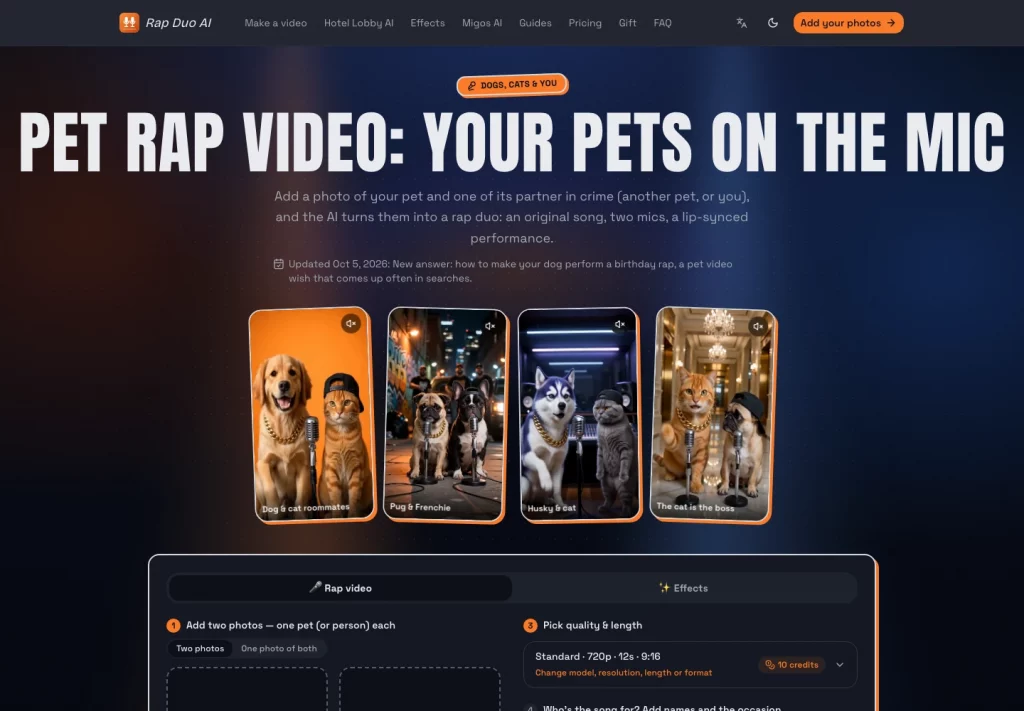
One example is Rap Duo, which focuses on creating rap-style videos featuring two people. The platform allows users to work with portrait images and generate music-based performances with automated audio and facial synchronization. Tools in this category can be useful for experimental social content, team celebrations, and creative promotional clips where a music-driven format is appropriate.
However, specialized platforms are not a replacement for every type of video editor. Their value depends on whether the available features match the creative requirements of the project.
Selecting the Right Production Method for Your Marketing Needs
Creative teams should select video production tools based on their content objectives, available resources, and desired level of creative control.
General-purpose timeline editors remain a strong choice for projects involving detailed storytelling, custom animations, multiple video layers, and precise post-production adjustments. They provide flexibility and allow editors to refine nearly every aspect of the final output.
Specialized video generation platforms offer an alternative for repetitive or format-specific tasks. By automating elements such as audio synchronization, facial animation, and scene generation, they can reduce production time and make certain creative formats more accessible.
Ultimately, the most effective production strategy may involve using both approaches. Teams can rely on automated generation for initial video creation and use conventional editing software for final refinements, branding, subtitles, and distribution-specific adjustments.
Choosing tools according to the requirements of each project helps maintain production quality while making better use of creative resources.whenever the moment calls without draining agency budgets.