You ask an AI to build an expense tracker. Seconds later a polished app fills your browser. You share the public link and, boom, 502 error.
Prompting feels easy; deploying is the hard part. Production has to line up runtimes, hide secrets, enforce auth, and handle real traffic: jobs the sandbox only pretends to do.
Vibe coding can whisk an idea into working code, yet Stack Overflow’s 2026 survey reports that nearly half of developers (48 percent) trust AI when they can easily validate its answers.
This guide closes that gap so you can ship without build errors, data leaks, or surprise bills.

The first prompt is the easy part
Why the preview feels safe.
Inside the editor, you’re alone with the AI in a sealed sandbox:
- Fixed browser version and operating system
- Simulated network latency (often 0 ms)
- Sample data that never touches a real database
- A hidden build pipeline and environment variables
Because nothing unpredictable enters, everything looks perfect. Our eyes trust the preview, and our brain assumes the code is sound. That illusion shatters as soon as you press Deploy and the wider web pushes back.
Choose your deployment lane before the AI locks it in
Your first tool quietly decides where your app lives: hosting, database, even payments. Switching later can mean rewriting half the stack. Pick a lane now by asking:
- How much control do I need over runtime and code export?
- How much setup time can I spare today?
- How willing am I to run backups, logs, and updates myself?
The next three sections outline the trade-offs.
- A fully managed “business-first” platform.
- A browser builder with hosting baked in.
- A code-first route with an external host.
Choose once; it shapes every deployment step that follows.
Lane 1: A managed, business-first route.
Imagine a concierge handing you a turnkey shop: domain, hosting, customer log-ins, billing, and a one-page dashboard. Platforms such as Spark, built by Plus Docs, create the website or web app with hosting, customer accounts, and payments included while you focus on pricing and copy. You can publish free on a spark.site address; taking payments and connecting a custom domain need a paid plan.
- Pros: you could sell a course or membership the same morning you draft the landing page.
- Cons: you ride one vendor’s rules. If its fees rise or if Stripe’s KYC rules delay payouts in India, you must adapt or migrate. You also remain responsible for lawful data storage and user deletion requests.
Gut-check question: am I comfortable letting a single platform own my storefront and customer data today? If yes, this lane gets you live fastest; just keep an exit plan handy.
Lane 2: A browser builder with hosting baked in.
Picture a food truck. You own the recipe and the branding, but the chassis, engine, and parking permit come bundled. Tools such as Replit, Lovable, and Bolt let you prompt, edit, and press Deploy.
Why beginners love it
- A single button spins up a server, database, and HTTPS URL.
- You can inspect live logs, tweak code in the browser, and share a working prototype before dinner.
Hidden trade-offs
- The platform fixes your runtime, Node version, and auth framework.
- Secrets live in a proprietary dashboard; moving them later means rewriting env-var calls.
- Free tiers throttle or bill after you cross specific limits (for Replit Autoscale, compute is metered by VM minutes, not visits).
- If a feature sunsets, as when Firebase Studio announced its shutdown, migration becomes weekend homework, not a quick patch.
Gut-check question: will you be happy riding this chassis for the next year, or do you already need fine-grained control over versions, backups, and India-friendly billing? If speed beats autonomy right now, this lane keeps your wheels turning with minimal fuss.
Lane 3: Code-first agent with an external host.
Here the AI writes code, but you own the pipeline: prompt in Cursor or Copilot Chat, commit to GitHub, and deploy to Vercel, Netlify, or any cloud you prefer. This route mirrors how professional teams work.
Why pick it
- Portability: move a repo and switch hosts in minutes.
- Control: pin Node or Python versions, add tests, hand the code to any teammate without exporting from a walled garden.
What you must handle
- Git basics: branch, commit, push.
- A build command (npm run build, pnpm run build) that matches the host runtime.
- Secrets in .env files; a typo can expose keys.
- Monitoring, backups, and rollbacks; no platform patches dependencies for you.
Choose this lane if you expect real traffic, need engineering hand-off, or want to avoid lock-in. If a command line still feels daunting, the earlier lanes may suit you better for now.
The six deployment cliffs hiding behind a working preview
Even after a flawless sandbox run, six hidden hazards can crash your first public build. Each one stems from the gap between “runs for me” and “runs for everyone.” We will tackle them one by one so you can spot and fix the drop-offs before users ever meet an error screen.
1. The production computer is not your computer.
Your code leaves a laptop that runs any Node version you installed, and it lands on a host that runs its own default Node version unless you pin one. One forgotten setting can break the build:
- A native module like bcrypt isn’t in the host image.
- Footer.js works on macOS but fails on Linux because file names are case-sensitive.
- Your package.json asks for an older Node version than the host runs, and the build refuses to start.
Beginners often tap “regenerate” hoping fresh code will heal the wound. A faster fix:
- Run the host build command locally (vercel build, npm run build).
- Read the first red line in the build log; Vercel surfaces it in the Build step panel.
- Align versions or install the missing dependency before touching another UI pixel.
Treat preview as a dress rehearsal. Opening night happens on someone else’s stage.
2. Secrets cannot travel inside the code.
In 2025 alone, GitGuardian detected about 29 million new secrets in public GitHub commits, up 34 percent year over year, according to its State of Secrets Sprawl 2026 report. The same report found internal repositories are six times more likely than public ones to contain hard-coded secrets, so a private repo is no safe place for an API key.
Treat every credential as cash.
- Add it in your host Environment Variables panel (Vercel → Settings → Environment, Replit → Secrets).
- Reference it in code (process.env.STRIPE_KEY), never as a literal string.
- Change a value? Redeploy, because the build packs variables only at compile time.
Leak a live Stripe key and you may refund fraudulent charges for weeks. Keep secrets in the vault, not the repo.
3. A login screen is not the same as access control.
Broken access control is the number-one risk in OWASP’s Top 10 (2025), and analysts found that 100 percent of the apps they tested had at least one access-control flaw. A sign-in form keeps strangers out, but row-level rules decide which signed-in user can touch which record.
Run four fast checks before you invite real users:
- Sign up, sign in, sign out.
- While logged out, paste a private URL: does it still open?
- Create two accounts and try to read each other’s data.
- Reset a password and make sure only the owner receives the email.
If any step leaks information, tighten your database’s row-level policies (Supabase RLS, Postgres ALTER POLICY, or your builder’s equivalent). This blind spot trips up novices and veterans alike.
Handle personal data like medical records: collect only what you need, fence it by owner, and log every failed peek.
4. Production lives at a different address.
Your preview link is a disposable backstage pass. The moment you point a real domain, or even swap localhost:3000 for the host sub-domain, every hard-coded URL in your code demands an update.
- OAuth callbacks. Auth0 rejects any redirect URI that is not on its Allowed Callback URLs list; the match must be letter perfect, down to the trailing slash.
- Payments and webhooks. Stripe requires live webhook endpoints to use HTTPS; an HTTP origin is blocked before the payload leaves Stripe’s servers.
- CORS. One character off in scheme, port, or path can trigger a browser cross-origin error.
Before launch, search your repo for every literal URL. Replace them with environment variables, add both staging and production origins to third-party dashboards, then run the full flow on the final domain in an incognito window. Users should never see a 404 that boils down to “callback went to the wrong street.”
5. “Free hosting” may not mean free business.
A ₹0 plan feels like a cheat code, until the fine print bites. Vercel’s Hobby tier is for personal, non-commercial use only, and its free allowance (currently 100 GB of fast data transfer and 4 CPU-hours of active CPU) is a hard cap: exceed it and, in most cases, you wait 30 days before you can use that feature again, or you upgrade to Pro.
Translation: the day you add a checkout button or hit the front page of X, your “free” host may throttle traffic or invoice you in USD. Costs rise on several dials: database reads, background jobs, outbound email, even AI credits.
Before launch, sketch a rupee-denominated budget:
- Check if the platform accepts UPI or Indian cards.
- Confirm whether prices are GST-inclusive.
- Set usage alerts or hard caps in the dashboard.
Future-you will thank present-you when a viral tweet lands and the bill stays predictable.
6. Launch day creates an operations job.
The minute strangers click your link, the prototype becomes a service. Without monitoring, your customers often spot an outage before you do. Unseen errors drain money too: every database read, background job, or AI call starts your billing clock.
You do not need enterprise tooling on day one, but switch on a starter kit:
- Uptime ping or cron check
- Error log with email or phone alerts
- Automated daily backup
- One-click rollback or version pin
Modern hosts help, but only if you enable them. Replit’s App Monitoring emails you the moment a published app fails and its Agent can even propose a fix, yet both toggles are off by default. Turn them on, add your Indian mobile number or email, and review the dashboard weekly.
Think of it as lending a spare key to a neighbour: most days nothing happens, but the day water seeps under the door you will be glad someone called.
One-click deploy is not one-click production
Modern builders love the big blue Deploy button: one tap zips your code, spins up servers, issues HTTPS, and returns a public URL in under a minute on most hosts. It feels magical, but that click fixes infrastructure only, not security, privacy, or future continuity.
Need proof? Google is shutting Firebase Studio down on 22 March 2027, and new workspaces could not be created after 22 June 2026, so projects built there must migrate or disappear.
The takeaway: automation cannot decide who sees each record, write a privacy notice, back up your database, or alert you when a bill spikes. Those jobs stay on your side of the screen.
Treat the button as an accelerator, not an autopilot. Press it early to surface build errors, then layer human choices (auth rules, backups, budget alerts) until the service can survive real users and real stakes.
Deploy the smallest live version early
1. Make the first milestone an “ugly” public URL.
Spin up the app on its real host, accept whatever grumpy-lemur-9y3z.vercel.app link you receive, and share it with one friend. If the build fails, you learn today, not on launch day. DORA research has long linked small batches to faster recovery from failures. Early exposure turns hidden cliffs into cheap bumps: you confirm the production build script runs, env-vars resolve, HTTPS certificates issue, and logs arrive.
2. Add risk one layer at a time.
Think staircase, not elevator:
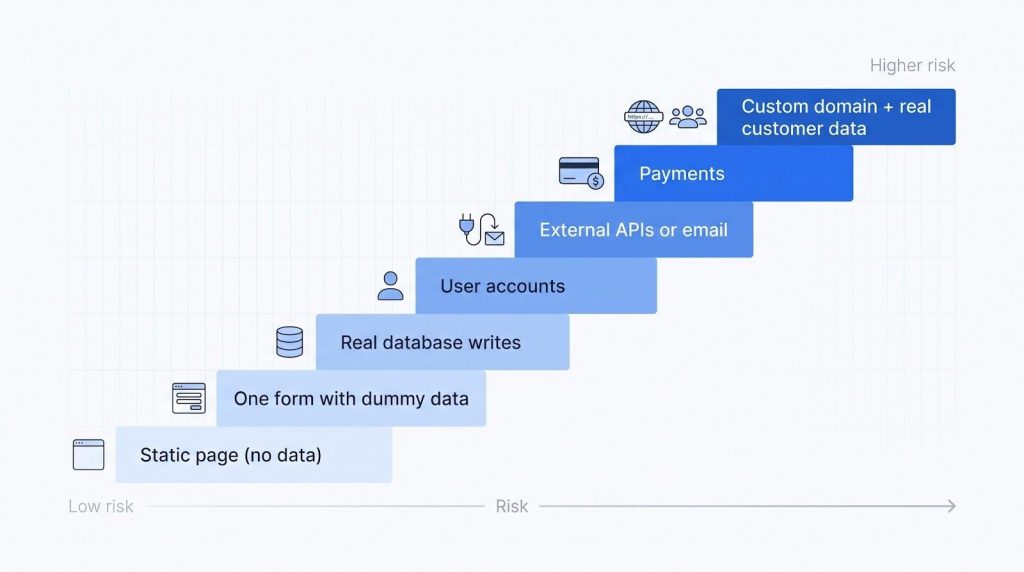
- Static page (no data)
- One form with dummy data
- Real database writes
- User accounts
- External APIs or email
- Payments
- Custom domain + real customer data
After each step, test success, empty, and error paths before moving up. Skipping a rung lets bugs hide in the gap.
3. Re-test production after every layer.
- Open the live link in an incognito window
- Run the new flow end to end
- Glance at the production log for red lines
- Confirm you can roll back or pause billing
Yes, repetition feels dull, but debugging a broken payment flow while customers post blank receipts feels worse, and every extra minute of reckless traffic can rack up INR charges you never budgeted for.
The most useful prompt is a deployment-readiness prompt
Before you ask the AI for another feature, have it list what already exists. Copy and paste this inventory prompt:
“List the framework, runtime version, build command, external services, required environment variables, authentication method, production URLs, logging location, backup process, monitoring alerts, and any open questions you need me to answer before deployment.”
Why bother? AI writes code faster than anyone can review it, and missing settings only surface at deploy time. A checklist uncovers those gaps early.
A solid agent reply should resemble a table:
| Item | Current value | Needs my input? |
| Runtime | Node 18 | No |
| Build command | npm run build | No |
| Env-vars | STRIPE_KEY, DATABASE_URL | Yes: provide production values |
| Logging | Vercel “Functions” tab | No |
| Backup | None configured | Yes: choose daily or hourly |
Print the list, fill the blanks, then verify each line in the host dashboard. Prompt for clarity, not code. This small shift turns the AI from an eager junior into a diligent pre-flight officer.
A beginner’s 15-minute production check
Many launch-day failures come from issues a simple pre-publish checklist would catch. You do not need a DevOps badge, just a timer and this routine.
1. Before you press Publish (≈ 6 min)
- Open staging and try to break it:
- Submit blank forms, garbled input, offline refresh.
- Commit the last “still-works” version and tag it rollback-YYMMDD.
- Search the repo for secrets (grep -i “sk_live” .). Replace with env-var placeholders.
- Run the production build locally (npm run build or vercel build). Stop at the first red line.
2. Immediately after Publishing (≈ 7 min)
- Load the public link in an incognito window and on a phone over mobile data.
- Sign up → in → out; create, edit, delete a record; reset the password.
- Open the host logs, trigger a 404, and confirm it registers as a 404 or 500.
- Hit one paid endpoint (Stripe test key, email sandbox) and watch for clear success and failure messages.
- Glance at the dashboard for spikes in bandwidth, database reads, or AI credits, so surprise invoices stay off your card.
3. Breathe (≈ 2 min)
Everything green? Message your first tester. Anything amber or red? Fix, rebuild, and rerun the list. Fifteen minutes, no special tools, full peace of mind.
For Indian builders, deployment also means payments, privacy, and workplace policy
India’s digital playground is vast. At around ₹95 per US $, a “$20” upgrade becomes roughly ₹2,240 after 18 % GST. Combine that cost math with strict new data rules and corporate security policies, and three extra checks appear before launch.
1. INR budgets and local payment rails
Dollar-priced plans blur true cost. Convert at the current RBI reference rate, add GST, and your ₹499 lifetime promise can vanish in hosting, database, and email fees. Some hosts, such as Replit and Vercel, bill only on USD cards, while others such as RazorpayX-backed Lovable accept UPI for Indian accounts. Verify:
- Does the platform take UPI or Indian credit cards?
- Are prices GST-inclusive?
- What is the monthly rupee ceiling per active user?
2. DPDP turns personal data into a compliance topic
The Digital Personal Data Protection Act, 2023 became law on 11 Aug 2023, and its Rules 2025 notified on 13 Nov 2025 give organisations 18 months to comply. Even a one-page app must:
- Obtain consent in plain language.
- Store only necessary data.
- Secure it and allow deletion on request.
Draft a short privacy notice and test your “delete me” flow. (Not legal advice; consult counsel for edge cases.)
3. Shadow IT in the workplace
Publishing an internal HR dashboard without sign-off can breach company policy and the DPDP Act. Check with IT before connecting corporate data and be ready to migrate the project to an approved environment if it graduates from side experiment to production.
Address these three fronts early (rupee budgeting, DPDP compliance, and workplace approval), and you will dodge the late-night “surprise compliance” stories founders trade over chai.
Know when to stop prompting and call an engineer
AI is great at drafting code, but reviewing its output takes real time. When review time or risk outweighs the benefit of another prompt, pause and escalate.
Reach out to a professional whenever:
- You cannot point to where user data lives or how to restore it.
- Two accounts can see each other’s records and tightening rules breaks the app.
- The project now handles payments, health data, or children’s information.
- The agent suggests disabling authentication temporarily to fix a bug.
- The same error returns after every deployment.
- Your company plans to rely on the tool for daily work.
Next step: package the repo link, build logs, and a short problem summary for the engineer or SRE. Escalating is not failure; it is like calling a structural expert before guests check in. You designed the lobby, they make sure the roof survives the storm.
The real beginner skill is verification
Prompting makes ideas appear, verification keeps them alive. Many builders ship AI-written code without ever running independent tests on it.
Start by treating every agent suggestion as a draft, not gospel:
- Read the diff.
- Ask, “What happens if this input is null or far too long?”
- Run the code in the same runtime and environment your users will hit.
If you cannot answer a question, dig until you can. Next, verify in production, not just staging. Flags flip, caches reset, real data finds edges the sandbox never meets. Each week:
- Scan error logs for new patterns.
- Snapshot the database and rehearse a rollback.
- Trigger one intentional 404 and confirm monitoring fires.
Reliability is a muscle. Train it and the app keeps its balance while you sleep. Master verification early and the AI becomes a tireless drafter while you become the engineer who knows it is safe to launch.
Frequently asked questions
What does “deployment” mean in vibe coding?
It is the moment your chat-generated app leaves the safe preview and runs on public infrastructure: real URL, HTTPS, live database, and real users. Think rehearsal versus opening night, where mistakes cost money, not just time.
Can a complete beginner deploy?
Yes. Stack Overflow’s 2026 survey found that nearly half of developers trust AI when they can verify its work. Start tiny (static page → one form), follow a 15-minute checklist, and learn one layer at a time.
Why does my app work locally but fail online?
Cloud hosts pin their own Node or Python versions and treat file names as case-sensitive. Run your host build command locally (vercel build, npm run build) and fix the first red line.
Is a one-click deploy production-ready?
The button builds servers and HTTPS but will not write access rules, back up data, or alert you when costs spike. Treat it as an accelerator, then add auth, logs, backups, and budget caps.
Is it safe to take payments?
Only after you 1) keep Stripe keys in env-vars, 2) lock row-level DB rules, 3) pass test transactions, and 4) keep a rollback handy. Payments sit on step 6 of the risk staircase for a reason.
Should I learn coding first?
Traditional coding helps, but vibe coding shifts your job from typing code to verifying behaviour. Start building, just read every diff and test every edge case.
What is the easiest first project to deploy?
A static information page or single-function tool: no log-ins, no money, no personal data. You can break it without exposing users or bank accounts.
How do dollar plans translate to rupees?
Multiply by the current RBI reference rate and add 18 percent GST. At around ₹95 per US $, a 20-dollar plan lands near ₹2,240. Check if the host accepts UPI or only USD cards.
Does the DPDP Act apply to my tiny app?
Yes. From November 2025 the Rules give organisations 18 months to comply. Even side projects must obtain consent, store only needed data, secure it, and delete on request. Consult a lawyer for edge cases.
Conclusion: code is cheap, verification is not
Stack Overflow’s 2026 survey showed that 48 percent of developers trust AI when they can easily validate its answers, while only 16 percent extend that trust to most tasks that are not important work decisions. That gap is not about talent; it is about verification.
- Choose a lane that matches your appetite for control.
- Ship a tiny live version fast, catching cliffs while the codebase is small.
- Add risk one layer at a time, from dummy form to payments.
- Switch on the ops kit: logs, alerts, backups, rollback.
- Verify in production every time you add a feature.
Follow those five moves and you keep the speed of AI while earning solid engineering trust. Grab that half-finished prototype, press Deploy, learn what the real world says, then iterate with eyes open.